Managing a Magic: The Gathering collection takes more than a list of cards. In this interview, Felipe, founder of MTG Relics, explains how Relics Binder, an MTG collection tracker, brings your collection, want list, sell list and artist signing projects into one place.
 Every Magic collector knows how fast it gets messy. One spreadsheet for the collection, a note on your phone for the want list, another list for the cards going to signings. Before a big event, that turns into hours of research. Relics Binder was built to fix that. It is part of Relics Tools, the MTG Relics suite of apps for players and collectors. We sat down with Felipe to see how it works in practice.
What is Relics Tools, and where does Relics Binder fit in?
Felipe: Relics Tools is a set of apps that makes life easier for people who play and collect Magic, from casual players to high-end collectors.
Relics AI helps with rules, card interactions and deck building. Buyer Advisor compares prices across Brazil, the United States and Europe before you buy. Relics Score evaluates collectible cards with our own criteria. And we have life counters, including for multiplayer games.
Relics Binder is one of the most complete tools, because it centralizes everything around your collection.
How do you track your MTG collection in Relics Binder?
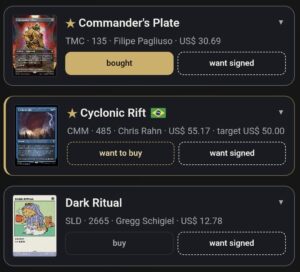
Felipe: The idea is to keep in one place the cards you own, the ones you want to sell, the ones you want to buy and even the ones you want signed by artists.
Instead of juggling spreadsheets, notes and separate lists, you see your current collection, your want list and your signing projects side by side. That changes how you manage a collection.
Does Relics Binder help you decide whether a purchase is worth it?
Felipe: Yes. Say you want a card, but you won’t pay today’s asking price.
You set how much you’re willing to pay and track that buying goal against market price references. For a deeper look, Buyer Advisor compares the same card across the Brazilian, American and European markets.
It stops being a shopping list and becomes a buying strategy.
How do you prepare cards for artist signings at an event?
Felipe: This is one of my favorite features to build. Anyone who has been to a MagicCon knows how much work it takes to organize cards for signings, with dozens of featured artists.
The manual way was to research each artist, find which cards they illustrated, check which of those you own and build a list by hand. In Relics Binder it takes three steps: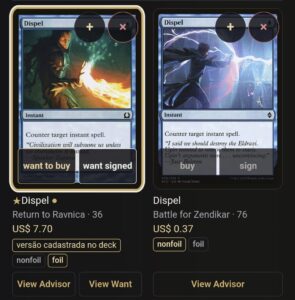
-
- Add your cards to the Binder, for example by importing a Moxfield list.
- Open the event’s artist page, copy its content and paste it into the app.
- The Binder detects the artists automatically and matches them to your cards, even when a name is misspelled. You get a list organized by artist, with the cards you already own and the ones you still want to get signed.
- Add your cards to the Binder, for example by importing a Moxfield list.
How much time does that save?
Felipe: A lot. Researching a single artist could take hours, depending on the size of your collection. Multiply that by every artist at a big event and you’re looking at days of manual work.
With the Binder, most of that work is done in minutes. And it’s not only time: you’re less likely to leave a card at home, and you get more out of the event.
Is Relics Binder still useful after the event?
Felipe: Yes. You organize your signing projects, mark which cards are already signed and record how much you paid for each signature.
That way you track progress, costs and what’s left, which is great if you’re working toward a fully signed Commander deck or a themed collection.
How do you track the value of your MTG collection?
Felipe: You record what you paid for each card and compare it with market references. That shows you what has gone up and what has gone down over time.
A gain on paper isn’t a realized profit. But that information helps a lot when you decide whether to buy, hold or sell.
What is the main promise of Relics Binder?
Felipe: Everything in one place: what you own, what you want to buy, sell or get signed, with information that helps you decide better. Less time managing lists, more time playing Magic and building your collection.
Try Relics Binder
Relics Binder is part of Relics Tools, built by MTG Relics for Magic: The Gathering players and collectors.
Open Relics Tools and start organizing your collection
Want to see the Binder in action? Follow @mtgrelics on Instagram.
Relics Binder FAQ
What is Relics Binder?
Relics Binder is an MTG Relics app for managing Magic: The Gathering collections. It brings together the cards you own, the ones you want to buy or sell and the ones you plan to get signed by artists, with market price references.
Can I import my Moxfield list into Relics Binder?
Yes. Copy your decklist from Moxfield and paste it into Relics Binder. The app recognizes the cards and adds them to your collection, so you don’t have to enter them one by one.
How do I know which cards to bring for signings at MagicCon?
Add your collection to Relics Binder, copy the event’s artist page and paste it into the app. It detects the artists, even with misspelled names, and shows which of your cards each one illustrated.
Can I track the value of my MTG collection?
Yes. You record what you paid for each card and compare it with market references. You can see what has gone up or down, keeping in mind that a gain on paper isn’t a realized profit.
Does Relics Binder track how much I paid for signatures?
Yes. In your signing projects you mark the cards already signed and record what you paid each artist, so you can follow the progress and total cost of each project.